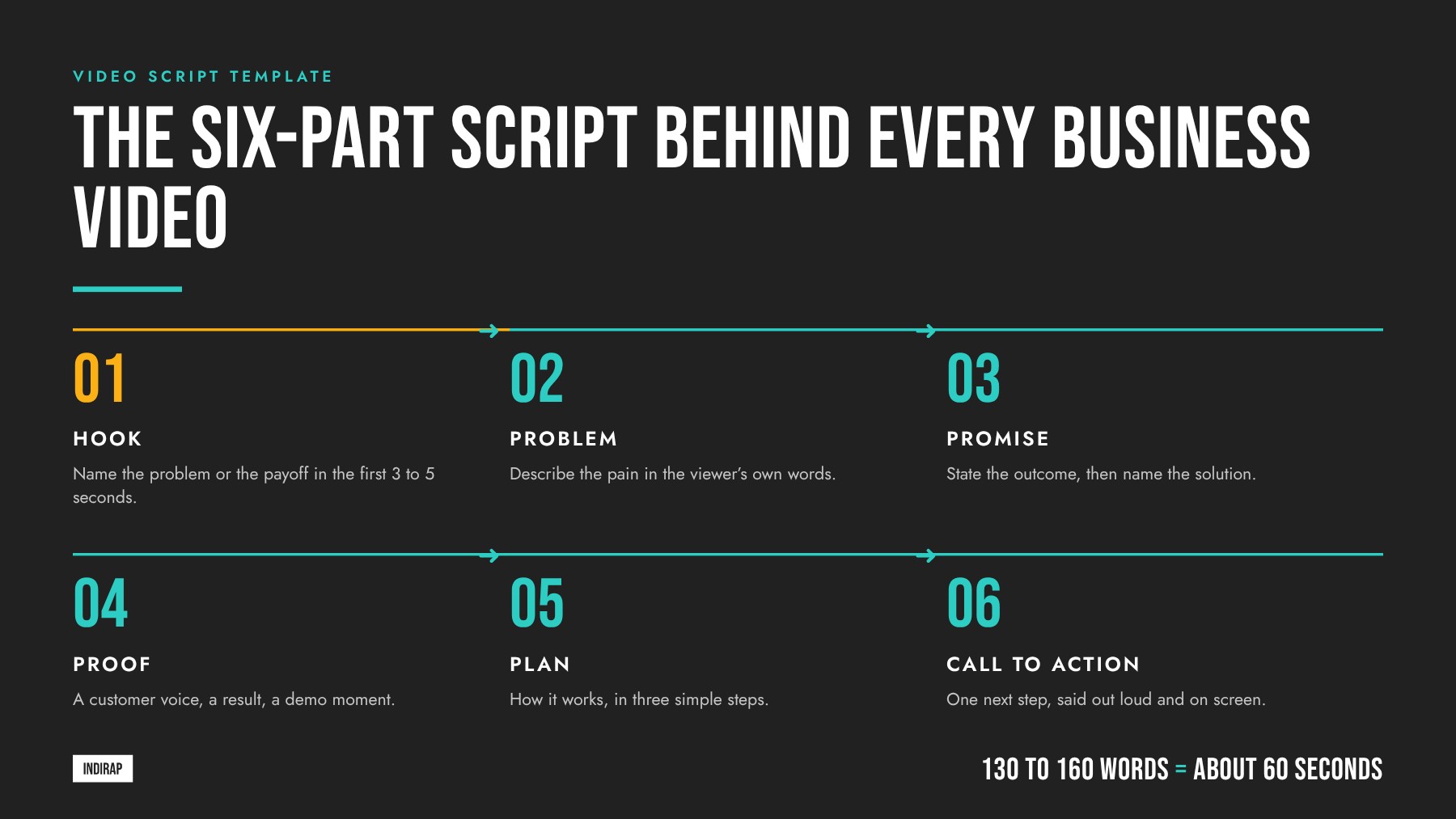
A video script template is a reusable outline that tells you what to say, what to show, and how long each moment should run. The six-part template below (hook, problem, promise, proof, plan, and call to action) works for brand films, explainers, testimonials, ads, and social clips, and keeps every script focused on one business outcome.
INDIRAP has written and produced more than 20,000 videos for over 900 brands across 40+ industries since 2013, and the scripts that perform share the same skeleton. This guide gives you that skeleton as a fill-in template, shows how to adapt it by video type and length, and walks through the two-column format professional crews use on set. If you would rather hand the whole process to a team, explore our video production services or Book A Video Strategy Call.
A video script template is a pre-built outline with labeled sections, timing guidance, and prompts that you fill in for each new video. It turns a blank page into a short list of decisions: who is this for, what do they need to hear first, what proof will they believe, and what should they do next.
Templates matter because a business video is usually reviewed by several people. A marketing lead, a subject matter expert, a legal reviewer, and an executive sponsor all bring opinions. When everyone reviews against the same structure, feedback becomes specific ("the proof section needs a number") instead of vague ("it feels off"). That keeps approvals fast and protects the core message from drifting during edits.
A good template also does a second job: it connects the script to production. Each scene in the template carries a visual cue, so the producer can build a shot list, the director knows what to capture, and the editor knows what to cut. Our guide to the corporate video production process shows where the script sits in that workflow.
The six parts follow the way a viewer makes a decision. They notice, they recognize their situation, they hear a better outcome, they look for evidence, they want to know how it works, and they need a clear next step. Here is each part with the job it does and a prompt you can fill in.
The hook earns attention. Open on the viewer's problem, a surprising result, a bold claim you can back up, or a striking visual. Prompt: "If you are a [role] dealing with [problem], this is for you." Our guide to video hooks that sell breaks down five hook types that work in B2B.
Name the pain in the viewer's own words. Use the language your sales team hears on calls and the phrases customers use in reviews. Prompt: "Every week, [audience] spends [time or money] on [task] because [root cause]." Keep it short and specific; one clear problem beats three general ones.
State the outcome your product, service, or idea delivers. Lead with the result, then introduce the solution. Prompt: "Imagine [desired outcome] without [current friction]. That is what [solution] does."
Give the viewer a reason to believe. Strong proof includes a customer voice, a measurable result, a live product moment, an award, or a credential. Prompt: "[Customer or data point] shows [result]." Real customer stories are the most persuasive proof, which is why testimonial videos and case study videos sit at the bottom of so many funnels.
Show how it works in three simple steps. Three is enough for the viewer to follow and few enough to remember. Prompt: "Here is how it works: first [step], then [step], and finally [step]."
Tell the viewer exactly what to do next, and say it out loud as well as on screen. Prompt: "[Action verb] at [place] to [benefit]." Use one call to action per video. If the video runs in several places, write a separate call to action line for each placement and mark it as an alternate.
Professional scripts use a two-column format. The left column holds the audio: voiceover, dialogue, interview soundbites, and music cues. The right column holds the visuals: shots, on-screen text, graphics, and B-roll. Each row is one beat of the video, and each row carries an estimated duration.
Here is the template in that format, ready to copy into a document or spreadsheet:
| Section | Time | Audio (what the viewer hears) | Visual (what the viewer sees) |
|---|---|---|---|
| Hook | 0:00 to 0:05 | One line that names the problem or the payoff | Strongest image you have; motion in frame one |
| Problem | 0:05 to 0:15 | The pain in the buyer's words | The problem in action; a real setting |
| Promise | 0:15 to 0:25 | The outcome and the solution name | Product, service, or person delivering it |
| Proof | 0:25 to 0:40 | A customer line, result, or credential | Customer on camera, data on screen, or demo |
| Plan | 0:40 to 0:52 | Three steps, one sentence each | One shot or graphic per step |
| Call to action | 0:52 to 1:00 | One next step, said out loud | Logo, URL, and the action as on-screen text |
The visual column is where in-house scripts benefit most from extra care. If the right column is empty, the crew has to guess, and guessing costs time on set. Fill every visual cell, even if the note is simply "interview, medium shot." For help choosing those shots, see the 17 best camera shots for video production and our guide to B-roll.
Length follows the placement. A useful working rate for a clear, conversational voiceover is roughly 130 to 160 spoken words per minute. Use that rate to size your script before anyone records a word.
| Video length | Approximate word count | Where it usually runs |
|---|---|---|
| 15 seconds | 30 to 40 words | Paid social, YouTube bumpers and in-stream |
| 30 seconds | 65 to 80 words | Paid social, connected TV, LinkedIn ads |
| 60 seconds | 130 to 160 words | Website hero, product pages, social |
| 90 seconds | 200 to 240 words | Explainers, landing pages, sales outreach |
| 2 to 3 minutes | 260 to 480 words | Brand films, case studies, YouTube |
For shorter cuts, compress rather than delete. A 15 second version usually keeps the hook, the promise, and the call to action, with proof carried by a single on-screen line. A 60 second version keeps all six parts. Longer videos expand the proof and plan sections with more customer voices or more product detail. Our article on how long business videos should be goes deeper on matching length to the job.
The six parts stay the same; the weight shifts. Here is how the emphasis changes for the formats businesses use most.
The same flexibility works across industries. A script for a technology or software brand leans on the plan and proof sections to make an abstract product concrete, while a script for a financial or wealth management firm leans on trust, credentials, and a calm, human voice.
The template gives you structure; the writing gives you attention. These habits keep viewers watching to the call to action.
Write for the ear. Scripts are heard, so read every line out loud. Short sentences, everyday words, and contractions sound natural. Long clauses and jargon sound like a brochure.
Say one thing. Every video should land one message. Before you write, finish this sentence: "After watching, the viewer should believe ___." If you need two sentences, you probably need two videos.
Show, then say. Let the visual carry the information and let the voiceover add meaning. If the screen already shows a dashboard, the voiceover can explain why it matters rather than describing what is on screen.
Put the brand in early. Viewers who leave halfway through should still know who made the video. A product shot, a logo moment, or a spoken brand name in the first few seconds helps.
Use real language. Pull phrases from sales calls, support tickets, and customer interviews. Buyers recognize their own words, and those words also help the video get found in search and AI answers.
The video below walks through two practical script formulas, one for building trust and one for promotional videos that drive action, with examples of strong and weak openings. It is a useful reference to share with anyone on your team writing a first draft.
Notice how both formulas start with the viewer and end with a single, specific action. That is the same logic behind the six-part template: the structure keeps the script honest about who it serves and what it asks for.
A script is also a production plan. When you mark the script before the shoot, a single production day can supply the hero video plus a library of shorter assets. INDIRAP builds every production around this capture once, deploy many approach.
This is the model behind our Content Kit, and it is why the script deserves more time than any other part of pre-production. If you want a second set of eyes on your plan, our free content strategy review is a fast way to pressure-test it before you commit to a shoot.
Keep the circle small and the roles clear. A typical business video script involves four people:
Two review rounds usually cover it: one for message and accuracy, one for polish and timing. Read the script out loud in the second round, ideally with a timer running. If you are working with an agency, ask how they structure script reviews before you sign; it is one of the most useful questions to ask before hiring a video production company.
A well-written script becomes a transcript, and transcripts are text that search engines and AI assistants can read, quote, and cite. When the script answers a real buyer question in plain language, the finished video can support rankings on YouTube and Google and earn mentions in AI answers.
Three habits help. State the core answer in the first 15 seconds, so both viewers and crawlers get it immediately. Use the exact phrasing buyers search for in at least one line. And publish the cleaned transcript alongside the video on your site. Our guides on writing a video transcript for SEO and getting cited by AI with video cover the full playbook.
INDIRAP treats the script as the blueprint for a content system. Our team starts with your business goal and your buyer, writes one script that serves the hero video and every cutdown, and plans the shoot so each line has the visual it needs. Strategy, writing, production, post-production, and distribution sit under one roof, so nothing gets lost between the page and the final cut.
Explore our corporate video production work, see results in our client success stories, or Book A Video Strategy Call to scope your next script and shoot.
A video script template is a reusable outline with labeled sections, timing, and prompts for every part of a video. The most useful version for business has six parts: hook, problem, promise, proof, plan, and call to action. You fill in each section for your audience and message, which turns a blank page into a short list of decisions.
Use a two-column format. The left column holds the audio (voiceover, dialogue, interview lines, and music cues) and the right column holds the visuals (shots, on-screen text, graphics, and B-roll). Each row is one beat with an estimated duration, so the crew can build a shot list and the editor can cut directly from the page.
A 60 second script usually runs about 130 to 160 words, based on a natural, conversational speaking pace. A 30 second script lands near 65 to 80 words, and a 90 second explainer near 200 to 240 words. Read the script out loud with a timer before production to confirm the pacing feels comfortable.
The first five seconds should name the viewer's problem, promise a clear payoff, or show the strongest image you have. This is the hook, and it decides whether the rest of the video gets watched. Put the brand in early too, so viewers who leave quickly still know who made the video.
Yes. Write the full script first, then mark the lines that can stand alone and the sections each shorter cut keeps. A 15 second version usually keeps the hook, the promise, and the call to action. Planning these versions before the shoot lets one production day supply the hero video, cutdowns, and vertical clips.
Script the questions, not the answers. Write the interview questions so each one leads to a section of the template, such as the problem, the result, or the recommendation. Real people sound best in their own words, and the editor builds the final story from the strongest answers, guided by the structure you planned.
Name one final approver before the first draft goes out. The writer owns the draft, a subject matter expert checks accuracy, and the marketing owner confirms audience, placement, and call to action. Two focused review rounds, one for message and one for polish and timing, keep the process fast and protect the core message.
The script becomes the transcript, which is text search engines and AI assistants can read and quote. Answer the core question in the first 15 seconds, use the exact phrases buyers search for, and publish the cleaned transcript with the video. Those habits help the video support rankings and earn citations in AI answers.


Julian Tillotson is the Founder & CEO of INDIRAP, a full-service video production and creative strategy agency based in Chicago, IL. With 10+ years of experience, INDIRAP has delivered 20,000+ videos to 900+ clients across 40+ industries, making it one of North America's leading digital creative agencies.