An explainer video script is the written plan for a short video that shows a buyer what problem you solve, how your solution works, and what to do next. The strongest explainer scripts follow four beats (problem, solution, how it works, call to action) and fit 60 to 90 seconds, which is roughly 150 to 240 spoken words.
Explainers are often the first real conversation a buyer has with your brand, so every line has to earn its place. INDIRAP has produced more than 20,000 videos for over 900 brands since 2013, including animated and live action explainers for technology, financial, medical, and manufacturing companies. This guide gives you the four-beat explainer video script formula, a fill-in template, a worked example, and the writing habits that keep viewers watching. To see the format in production, visit our animated explainer video production page.
An explainer video script is the voiceover, on-screen text, and visual direction for a short video that explains a product, service, process, or idea. It is usually written in two columns, with narration on one side and visual notes on the other, and it is the single most important document in explainer production.
An explainer has a narrow job: help a busy buyer understand something quickly enough to take the next step. That job shapes everything in the script. The language stays simple, the structure stays predictable, and the runtime stays short. If you are deciding whether an explainer is the right format at all, start with our guide to what an explainer video is and when to use one.
The script also drives the budget and timeline of an animated explainer more than any other factor. Every scene you write is a scene someone has to design and animate, so a tight script keeps the project focused and the revisions few. Our overview of explainer video production covers how the script fits into the full workflow.
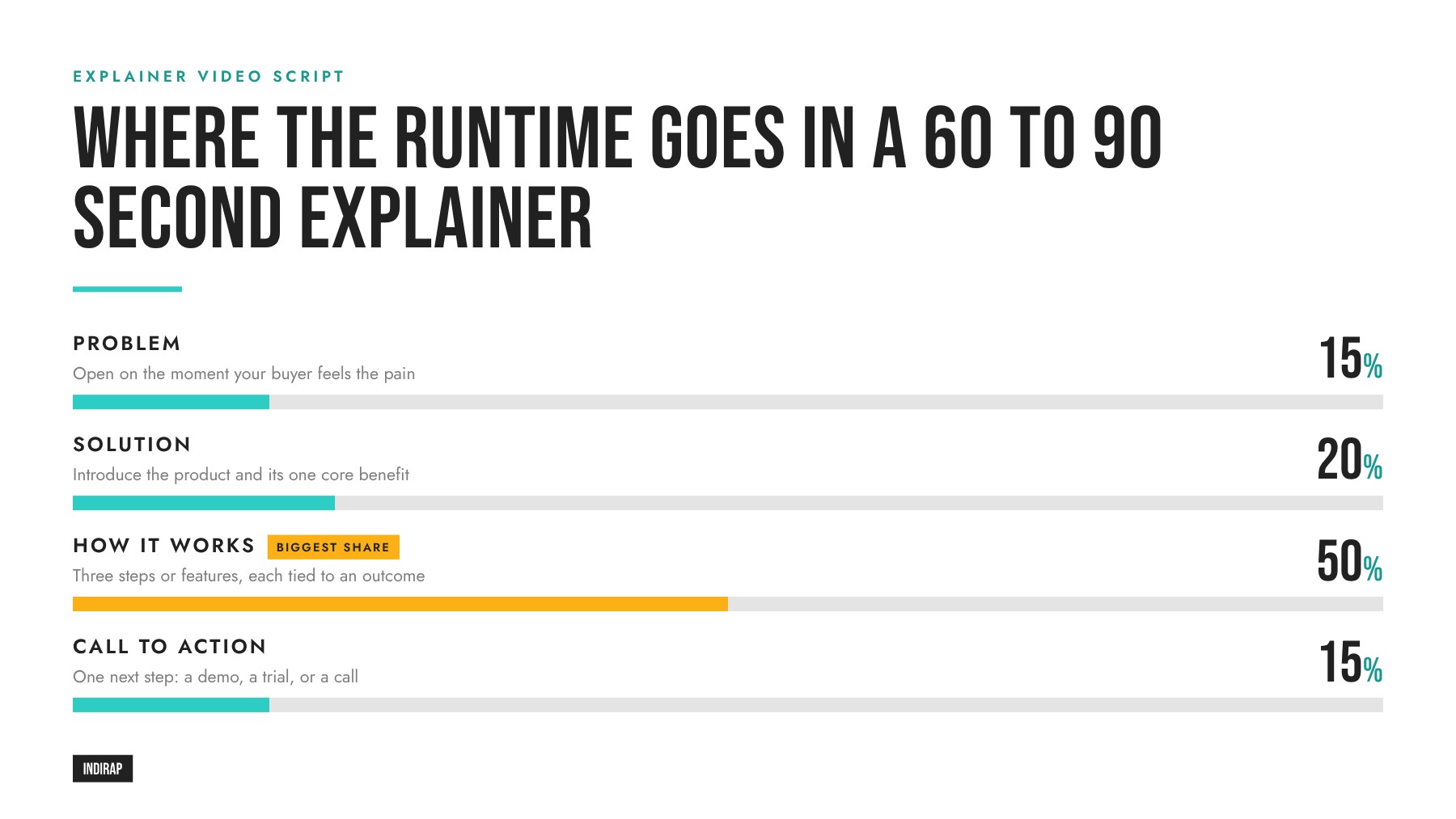
The classic explainer formula has four beats, and each one answers a question the viewer is silently asking.
Question answered: "Is this for me?" Open on the moment your buyer feels the pain. Describe it in their language, with a specific situation they recognize. A character, a scenario, or a single sharp statement all work. Keep it to two or three sentences.
Question answered: "Is there a better way?" Introduce your product or service as the answer, name it clearly, and state the single most important benefit. This is where the brand appears in full, so the viewer connects the relief to your name.
Question answered: "How exactly does it work?" Walk through three steps or three core features, one sentence or two each, and tie every one to an outcome. This beat carries the explanation, so it deserves the most screen time and the most visual care.
Question answered: "What do I do now?" Give one specific next step, such as booking a demo, starting a trial, or talking to the team. Say it in the voiceover and show it on screen, and keep the final frame up long enough to read.
The percentages are a guide, not a rule. A product with a familiar problem can shorten beat one. A complex platform may need more time in beat three. What stays constant is the order, because the order mirrors how people move from curiosity to action.
Here is the four-beat formula as a fill-in template for a 75 second explainer. Copy it into a document and replace the bracketed prompts.
| Beat | Time | Voiceover prompt | Visual direction |
|---|---|---|---|
| Problem | 0:00 to 0:12 | "[Audience] spends [time] on [task] because [root cause]." | Character or user in the real situation; the friction made visible |
| Solution | 0:12 to 0:27 | "Meet [product]. It helps [audience] [primary benefit]." | Logo reveal, product in context, a clean transition from the problem scene |
| How it works, step 1 | 0:27 to 0:39 | "First, [action], so you can [outcome]." | Product screen or animated diagram of step one |
| How it works, step 2 | 0:39 to 0:51 | "Then, [action], so [outcome]." | Step two with a simple on-screen label |
| How it works, step 3 | 0:51 to 1:03 | "Finally, [action]. [Result statement]." | Step three, then the outcome the character now enjoys |
| Call to action | 1:03 to 1:15 | "[Action verb] at [place] to [benefit]." | Logo, URL, and the action as text; hold for at least three seconds |
For a broader template that covers brand films, testimonials, and ads as well as explainers, see our video script template, which uses a six-part structure built on the same logic.
Here is a short example for a fictional scheduling platform called Rosterly, written to the template. It is illustrative only, so you can see how the prompts become real lines.
| Beat | Voiceover | Visual |
|---|---|---|
| Problem | "Every Monday, Dana's operations team loses half a day rebuilding the shift schedule. One call-out and the whole week falls apart." | Dana at a desk covered in sticky notes; phone buzzing; schedule grid collapsing |
| Solution | "Meet Rosterly, the scheduling platform that keeps shifts covered automatically." | Sticky notes sweep away; Rosterly logo resolves on screen |
| How it works | "Set your coverage rules once. When someone calls out, Rosterly finds the best available replacement and sends the request. Managers approve in one tap, and the schedule updates for everyone." | Rules screen; call-out alert; replacement match animation; one-tap approval on a phone; updated schedule |
| Call to action | "Get your Mondays back. Book a 15 minute demo today." | Dana relaxed with coffee; logo and demo call to action on screen |
That example runs about 85 words of voiceover. At a relaxed pace it fills roughly 45 seconds, leaving room for music, pauses, and a longer visual of the product in action. Notice that every feature line ends with a benefit and that the problem appears in a single, specific situation.
Size the script to the placement and the complexity of what you are explaining. A natural speaking pace runs roughly 130 to 160 words per minute, so these ranges are a reliable starting point.
Shorter is usually better for cold audiences, and longer works once a viewer has chosen to learn more. Many brands produce a 60 to 90 second hero explainer plus a 30 second cutdown from the same script. Our article on how long business videos should be explains how attention changes by placement.
Structure gets you a clear draft. These habits get people to the call to action.
Lead with the viewer. The first line should be about the buyer's situation, and the brand name can wait a few seconds until the viewer is ready to care.
Use one character or one scenario. A single relatable person, or one concrete situation, makes an abstract product easy to follow. Explainers for technology and software brands rely on this heavily because the product itself is often invisible.
Write benefits, then features. "Automatic call-out coverage" is a feature. "Get your Mondays back" is the benefit. Pair them, with the benefit doing the persuading.
Cut every line that the visuals can carry. If the animation already shows the dashboard updating, the voiceover can explain why that matters. Script the visuals with the same care as the words, since an explainer is a visual medium first.
Read it out loud, with a timer. Anything that trips your tongue will trip the voice actor. Anything over the target length gets trimmed before it reaches the animator.
The video below presents a four-step scriptwriting formula for explainers that maps closely to the beats above. It is a helpful companion for anyone writing their first explainer draft.
The common thread across strong explainer formulas is restraint: one problem, one product, three steps, one action. When a script tries to explain everything, the viewer remembers nothing, so the editing pass is often where the real script appears.
Choose the format that best shows how your product creates value. The script works for both, but the visual column changes.
The choice also affects how far one production can stretch. A live action shoot can capture the explainer, a brand video, customer testimonials, and social clips on the same day. Our guide to types of animation helps if you are deciding between animation styles, and our product video production work shows live action explainers in practice.
During review, look for these patterns and fix them before animation or production starts, when changes are still fast:
A structured review keeps feedback focused. Our guide to the corporate video production process explains how review rounds work from script to final cut.
A great explainer works well beyond the homepage. Sales teams send it before first calls so prospects arrive informed. Support teams use it in onboarding. Paid teams cut it into ads. And because the script becomes a transcript, it gives search engines and AI assistants clear, quotable text about what your product does.
To get the most from that last benefit, state the core answer in the first 15 seconds, use the phrases your buyers actually search for, and publish the cleaned transcript on the page with the video. Our guides to video SEO best practices and getting your video cited in Google AI Overviews cover the details. For B2B teams, our B2B video marketing strategy guide shows where explainers sit in a longer buying journey.
INDIRAP writes explainer scripts the same way we plan every production: start with the business goal and the buyer, land one message, and design the visuals alongside the words. Our team handles scripting, voiceover, animation, live action, and editing under one roof, and we plan each explainer so it also produces cutdowns, vertical clips, and sales versions.
Explore our video production services, see the wider range of corporate and brand video we produce, or get a second opinion on your current funnel with a free content strategy review. When you are ready to scope a project, Book A Video Strategy Call.
An explainer video script is the voiceover, on-screen text, and visual direction for a short video that explains a product, service, or idea. It usually follows four beats: the problem, the solution, how it works, and a call to action. A typical explainer script runs 60 to 90 seconds, or about 150 to 240 spoken words.
Use four beats in order. Open with the viewer's problem in about 15 percent of the runtime, introduce your solution and its main benefit in about 20 percent, spend about half the video on how it works in three steps, and close with one clear call to action. The order mirrors how buyers move from curiosity to action.
A 90 second explainer script usually runs about 200 to 240 words at a natural, conversational pace. That leaves room for music, pauses, and visual moments without rushing the narrator. Read the draft aloud with a timer, and trim anything that pushes past the target length before animation or production begins.
A good explainer script leads with the viewer's problem, uses one relatable character or scenario, pairs every feature with a benefit, and ends with a single call to action. It is written for the ear in short, everyday sentences, and it includes a visual note for every line so the animator or crew can bring it to life.
Choose animation for abstract or complex products such as software, financial concepts, or internal processes, because it can show what a camera cannot. Choose live action when trust comes from people, places, or a physical product. Hybrid explainers combine both. The four-beat script works for every format; only the visual column changes.
The script is usually written by a professional scriptwriter or the production partner's creative team, with input from a marketing lead and a subject matter expert. The brand supplies the buyer insight, product details, and approvals. Naming one final approver before the first draft keeps reviews fast and protects the core message.
Yes. Write the full hero script first, then mark which lines each shorter version keeps. A 30 second cutdown usually keeps the problem, one benefit, and the call to action. Add alternate opening lines for vertical social and alternate calls to action for email and sales, then capture everything in one production.
The explainer's script becomes its transcript, which gives search engines and AI assistants clear text describing your product. Answer the core question in the first 15 seconds, use the phrases buyers search for, and publish the transcript with the video. Pair the embed with VideoObject structured data so search engines understand the video.


Julian Tillotson is the Founder & CEO of INDIRAP, a full-service video production and creative strategy agency based in Chicago, IL. With 10+ years of experience, INDIRAP has delivered 20,000+ videos to 900+ clients across 40+ industries, making it one of North America's leading digital creative agencies.