A product launch video is the short film that introduces a new product, names the problem it solves, and tells buyers exactly what to do next. The strongest launches treat it as a suite: a teaser, a hero film, a demo, and feature cutdowns, all captured in one planned shoot.
A product launch video is any video created to announce, explain, or sell a new product or a major release during its launch window. People search for it under several names: launch video, product announcement video, product reveal video. The format changes with the audience, but the job stays the same. It moves a viewer from "I have never heard of this" to "I want to see more" in as little time as possible.
That job is different from evergreen product video. A standard product video lives on a page for years and answers questions for buyers who are already shopping. A launch video carries urgency. It has a date attached, it has a story about why now, and it is usually the first time your market sees the product at all. That means it has to do three things quickly: earn attention, make the value obvious, and point to one clear next step.
When we plan product video production for a launch, we start with the outcome the launch needs (pre-orders, waitlist signups, demo requests, retail sell-through) and work backward to the videos that will drive it. The film is the visible part. The strategy underneath it is what makes the launch perform.
These terms overlap, and buyers use them interchangeably. In practice, a product reveal video focuses on the first look, usually with design, packaging, or the physical product as the hero. A product announcement video leans on the news itself: what is new, who it is for, and when it is available. A product launch video is the umbrella term that covers both, plus the demo and conversion content that follows.
A single hero film rarely carries a launch on its own. Buyers meet your product in different places and at different levels of interest, so the launch needs different cuts for different moments. Think of it as a launch video suite: a small library of assets built from one core message.
| Asset | Typical length | Primary job | Where it lives |
|---|---|---|---|
| Teaser | 6 to 20 seconds | Build anticipation and capture waitlist signups | Instagram Reels, LinkedIn, YouTube Shorts, email |
| Hero announcement film | 60 to 120 seconds | Introduce the product, the problem, and the promise | Website hero, YouTube, launch email, press kit |
| Explainer or demo | 90 seconds to 3 minutes | Show how it works and answer the first questions | Product page, YouTube, sales follow-up |
| Feature cutdowns | 15 to 45 seconds each | Sell one benefit at a time | Paid social, organic social, email |
| Customer or UGC-style video | 20 to 60 seconds | Add proof from real users | Paid social, product page, retargeting |
| Sales enablement video | 1 to 5 minutes | Give reps and partners a consistent pitch | Sales decks, outreach emails, partner portals |
The teaser creates curiosity before the product is public. It shows enough to make the viewer lean in (a silhouette, a texture, a single feature, a date) and asks for a small commitment like joining a waitlist or turning on notifications. Keep it short and vertical-friendly so it travels well on Instagram Reels and YouTube Shorts.
This is the centerpiece: the video on your homepage on launch day and the one your team shares first. It tells the full story in one to two minutes. It is closest to a commercial in polish, and it usually carries the most brand weight of the suite. For a company launching a new flagship line, this film often doubles as brand video for the year ahead.
Once a buyer is interested, they want to see the product work. A demo walks through real use. When the product is software, abstract, or hard to film, an animated explainer video can make the mechanics clear in a way live footage cannot. Our guide on what an explainer video is and when to use one covers the format choices in more depth.
Cutdowns take one benefit and give it its own short video. They are the workhorses of paid media because you can test them against each other and scale the winners. A launch with five key features can easily support ten or more cutdowns once you add vertical and square versions.
Early users, beta testers, and creators bring a different kind of credibility. Their videos feel native to social feeds and answer the question "does this actually work for someone like me?" Our breakdown of UGC video ads explains how to brief and structure them so they perform as ads.
Your sales team, channel partners, and retail buyers all need to explain the product in their own conversations. A short enablement video gives them a consistent pitch, a clean demo, and answers to common objections. It is the most overlooked asset in a launch suite, and often the one with the longest useful life.
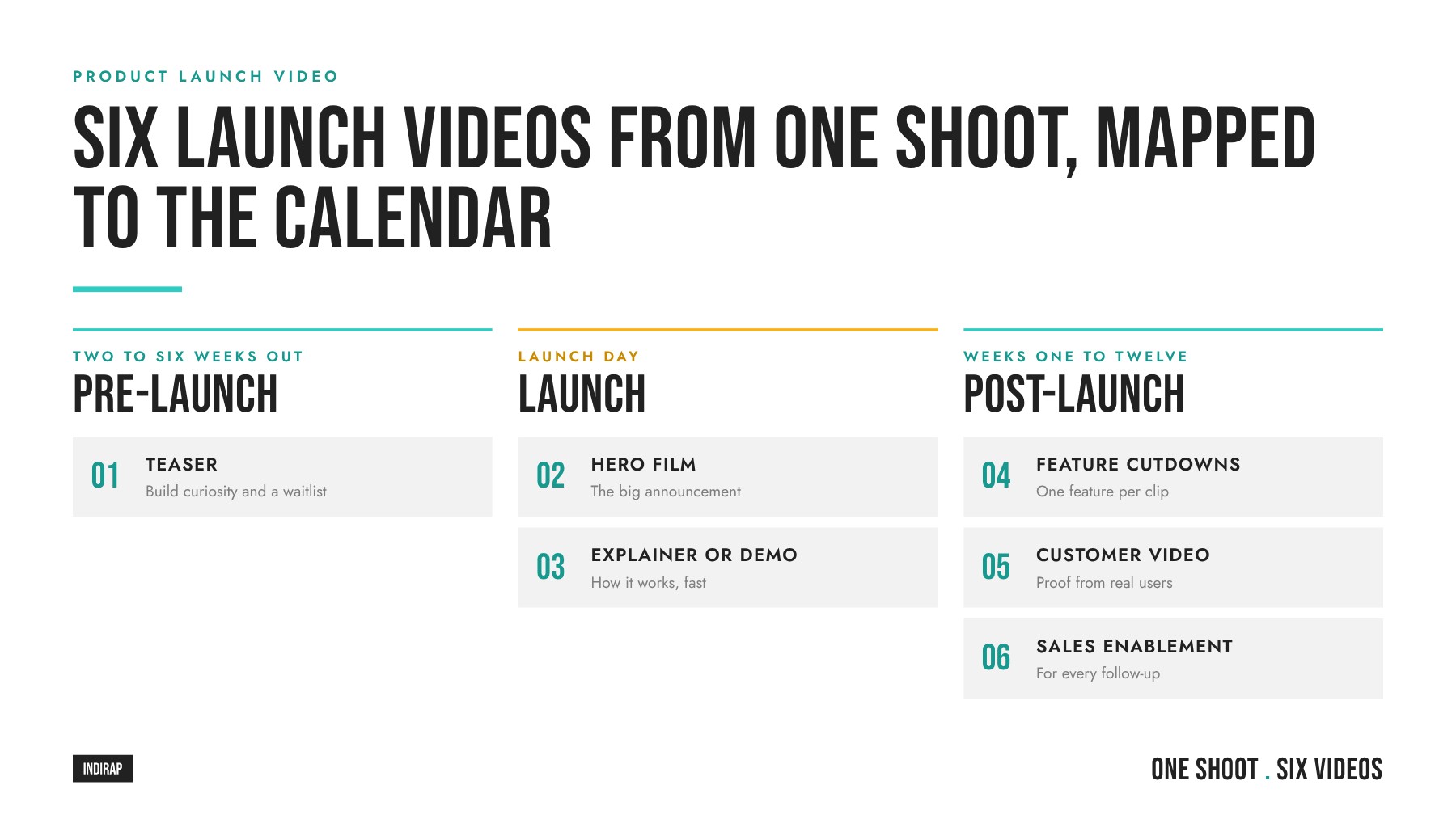
A launch is a sequence, and each video has a moment where it does the most work. Mapping the suite against a timeline keeps your team from dumping every asset on launch day and running out of things to say by day three.
Post-launch is where the return compounds. The hero film earns the attention, and the follow-up content converts it. Teams that plan for this phase from the start get months of usable content from a single production effort.
Every strong launch video starts with a message that fits in one sentence. We use a simple rule: one problem, one promise. The problem is the specific frustration your buyer feels today. The promise is the specific outcome your product delivers. If you can say both in a single line, you have the spine of the script.
Here is a useful test. Finish this sentence: "For [buyer] who [problem], [product] [promise]." If the sentence needs three commas and a list of features, the message is still too broad. Pick the problem that matters most to your best customer and let the other features support it later in cutdowns.
Answering these in a short creative brief keeps every stakeholder aligned before the camera rolls. It also makes it easy to brief editors, motion designers, and your paid media team later. If your launch sits inside a larger plan, connect it to your broader video marketing strategy so the launch builds on what your audience already knows about you.
A reliable structure for a hero launch film follows the buyer's thinking, from attention to action. Use it as a starting framework and adapt the timing to the length of the cut.
Shorter cuts compress this. A 15-second ad might be hook, reveal, one proof point, and a call to action. A three-minute demo expands the proof section into a guided walkthrough. Keeping the same order across every length makes the whole suite feel connected.
For a practical walkthrough of this approach from a B2B marketing perspective, this video covers a launch video formula built around customer problems, visual proof, and a clear call to action.
Notice how the structure keeps returning to the buyer's problem. That discipline is what separates a launch film people remember from one they scroll past. Once your script follows it, the next step is planning a production that captures every asset in the suite at once.
This is where a launch either becomes a content engine or a single video. The principle we build around is capture once, deploy many. Instead of producing the teaser, the hero film, the demo, and the social cutdowns as separate projects, you plan a single production that captures the raw material for all of them.
It starts with the deliverables list, before the shot list. Write down every asset the launch needs, every aspect ratio (16:9 for YouTube and your website, 9:16 for Reels and Shorts, 1:1 or 4:5 for feeds), and every channel. Then design the shoot so each setup feeds multiple deliverables. This is the thinking behind our Content Kit, which packages strategy, production, and a library of ready-to-publish assets from one engagement.
| Capture | Feeds these assets |
|---|---|
| Hero product shots (studio and in context) | Teaser, hero film, ads, product page, email headers |
| Product in use with real people | Hero film, cutdowns, demo, retargeting ads |
| Founder or product lead on camera | Announcement film, LinkedIn video, sales enablement |
| Feature close-ups and screen recordings | Feature cutdowns, demo, explainer inserts |
| Customer or beta user interviews | Testimonial cuts, UGC-style ads, case study content |
| Behind-the-scenes footage | Pre-launch social posts, Stories, recruiting content |
| Still photography | Press kit, website, paid ads, retail listings |
Framing matters here. Shooting with room for vertical crops, or running a second camera dedicated to 9:16, means you can cut social versions without losing the product from the frame. Capturing clean audio for every on-camera line gives editors flexibility to build new cuts weeks after launch.
Plan for animation, too. If parts of the product are invisible to a camera (data flows, software logic, internal mechanics), schedule motion graphics alongside the live shoot so the explainer and the hero film share one visual language. A partner offering full video production services can run live action, animation, and photography as one coordinated plan.
Distribution decides whether a great launch film gets seen. Each channel has its own viewing habits, so the right cut for each one matters as much as the film itself.
| Channel | Best cuts | Launch role |
|---|---|---|
| Website and product page | Hero film, demo, explainer | Convert interested visitors into leads or buyers |
| YouTube | Hero film, full demo, Shorts teasers | Searchable home for the launch and long-form detail |
| Founder announcement, hero cutdown, customer clips | Reach B2B buyers, partners, and your own network | |
| Instagram Reels | Vertical teasers, feature cutdowns, UGC-style video | Build awareness and anticipation with consumers |
| Thumbnail linking to the hero film or demo | Activate your warmest audience first | |
| Paid social | Cutdowns, UGC-style ads, retargeting demos | Scale reach and test which message converts |
Organic posts give your launch credibility and reach your existing audience. Paid media puts it in front of new buyers and lets you control timing. The two work best in tandem: organic engagement signals which cuts resonate, and paid budget scales the winners. Our guide to paid social advertising covers how to structure campaigns, and the article on the best ad creative explains what tends to win in testing. For ongoing organic output after launch, a dedicated social media video content plan keeps the momentum going.
For e-commerce launches, consider making the video itself the storefront. Shoppable video lets viewers move from watching to buying without leaving the experience, which shortens the path on launch day.
Views are a starting point. Measure each asset against the job it was built to do, and tie the suite back to the business goal of the launch.
Set your benchmarks before launch so you can read results quickly. If the hook rate is strong but click-through is weak, the opening works and the call to action needs attention. If completion is high but conversions are low, the landing page may be the gap rather than the video.
The framework stays the same across categories, but the emphasis shifts with how people buy.
B2B buyers research in committees and over longer cycles. Your launch video needs to make the value clear to an executive in sixty seconds and give a technical evaluator enough detail to keep going. That usually means a short hero film, a deeper demo, and an enablement cut for sales. Screen recordings, product UI, and animation do heavy lifting because software is hard to film. Founder-led announcements perform well on LinkedIn, where buyers want to hear from the people building the product. We work with many technology and software brands on exactly this mix of live action and motion graphics.
For B2B, the post-launch phase leans on proof. Case study video from early customers gives buyers the confidence to bring the product to their team, and it gives sales a reason to reach back out.
Consumer buyers decide faster and more emotionally. The product itself is often the star, so texture, design, and real-life use carry the story. Vertical video, creator content, and UGC-style ads matter more because discovery happens in social feeds. Short feature cutdowns and retargeting ads close the gap between interest and purchase. If your launch includes a retail or event moment, capture it, because that footage becomes social proof for weeks.
Physical products from manufacturing brands often sit in between: a B2B buyer, a tangible product, and a need for both technical detail and strong visuals. The suite approach handles that well because each audience gets the cut built for it.
For more creative inspiration, browse our collection of promotional video examples and our guide to how promotional videos drive sales.
INDIRAP has produced more than 20,000 videos for over 900 clients across 40+ industries since 2013, and we build launch content as infrastructure: one strategy, one production plan, and a full library of assets ready for every channel. As a corporate video production partner with in-house paid media, we plan the launch suite, produce it, and help put it in front of the right buyers. You can see the range of our work in our client success stories.
If you are weighing the investment, the useful question is what one new client is worth to your business. For many of the companies we work with, that number sits between $20,000 and $100,000, which makes a launch suite that keeps converting for months a straightforward decision.
Ready to plan your launch? Book A Video Strategy Call and we will map out the suite, the timeline, and the shoot with you. Prefer to start with feedback on what you have? Request a free content strategy review.
A hero product launch video usually runs 60 to 120 seconds, which is long enough to show the problem, the product, and proof without losing viewers. Teasers and social cutdowns work best at 6 to 45 seconds, while demos and explainers can run two to three minutes because the viewer is already interested and wants detail.
Start planning six to ten weeks before launch day so there is time for strategy, scripting, production, editing, and approvals. Teasers need to be ready two to six weeks before launch. Building in a buffer also protects you if the product changes late, which happens often during final development.
A product launch video should include a strong hook, the problem your buyer faces, a clear reveal of the product, visual proof that it works, a one-line promise, and a single call to action. Captions and on-screen text are essential so the story works with the sound off.
Use live action when the product is physical or when people and real environments sell the story. Use animation when the product is software, abstract, or has internal mechanics a camera cannot capture. Many launches combine both, with live action for emotion and animation for explaining how the product works.
Yes, a well-planned shoot can capture the raw footage for the teaser, hero film, demo inserts, feature cutdowns, testimonials, behind-the-scenes clips, and still photography. The key is building the deliverables list first, then designing each setup to feed several assets in multiple aspect ratios.
Your website should host the hero film because that is where conversions happen. From there, YouTube gives the launch a searchable home, LinkedIn reaches B2B buyers, Instagram Reels builds consumer awareness, and email activates your warmest audience. Paid social scales whichever cut performs best.
Track hook rate and watch time to see whether the video holds attention, then click-through rate and conversions to see whether it drives action. For the bigger picture, measure demo requests, pre-orders, sales usage, and pipeline or revenue influenced by viewers of the launch content.
Start with what one new client or customer is worth to your business, then consider how many the launch needs to win. For many INDIRAP clients a single new client is worth $20,000 to $100,000, so a launch suite that keeps producing results for months tends to pay for itself quickly.

Julian Tillotson is the Founder & CEO of INDIRAP, a full-service video production and creative strategy agency based in Chicago, IL. With 10+ years of experience, INDIRAP has delivered 20,000+ videos to 900+ clients across 40+ industries, making it one of North America's leading digital creative agencies.