Ever wondered why some videos just seem to pop while others fall flat? It's all about advanced video editing techniques. Sure, a quality camera matters, but how you edit the video determines its final impact and viewer retention.
A professionally edited video can turn mundane footage into a compelling story. And the best part? It's no longer an uphill battle, thanks to the latest, user-friendly video editing software.
So, whether you want to create YouTube vlogs or corporate videos for your business, you've come to the right place. Our video production guide covers several vlog editing techniques and professional video editing tips for everything from your product videos to social media video ads.
Whether you're a seasoned videographer or just starting out, understanding key video editing techniques can make all the difference in how your content is perceived.
Below, we share some editing tips to enhance storytelling and help you maintain viewer engagement.
Cutting on Action is one of the basic video editing techniques, yet it significantly enhances the flow of the scene.
This approach involves a cut between two shots precisely during an action sequence, often at a point where motion is fluid (and continuous). It keeps the viewers engaged by seamlessly transitioning from one perspective to another without disrupting the visual rhythm.
The following video shows how to create match cut transitions in Premiere Pro.
For instance, consider a soccer player kicking the ball towards the goal. Instead of showing the entire action in a single shot, the editor might cut to a close-up of the ball, leaving the player's foot just as it connects with the ball.
This quick transition enhances the intensity of the moment and draws viewers deeper into the action.
Nike is one of the brands that effectively utilizes this technique in its sports commercials. See the seamless integration of Nike's logo as the man strikes a running posture at the end of the video.
This involves abrupt transitions between shots within the same scene. It creates a sense of continuity while skipping over non-essential actions. Brands often use this technique to condense time and inject fast-paced energy into the video.
Here's a short tutorial on how to do this.
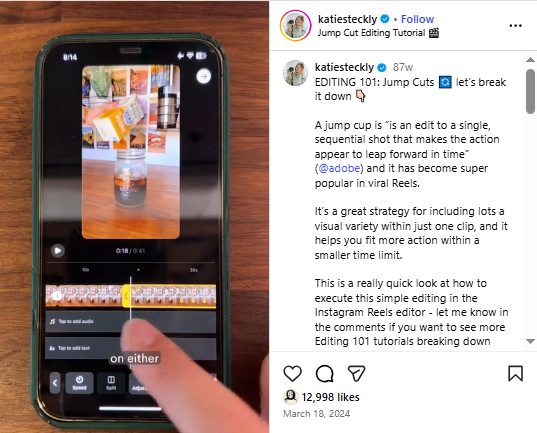
For instance, in a vlog about a day in the city, jump cuts might be used to skip between different activities like traveling on the subway or enjoying street food. Each jump cut keeps the viewers engaged by moving the story forward quickly and focusing on the most interesting aspects of the day.
A brand that masters the use of jump cuts is Buzzfeed in its Tasty cooking videos.
If you notice, Buzzfeed employs jump cuts between recipe steps. This maintains a brisk space while effectively conveying the essential information. Jump Cuts makes the video easy to follow and enhances the overall entertainment value.
Adding transitions is one of the best video editing techniques. It involves a seamless movement from one scene to another using effects like wipes, fades, or dissolves. These transitions smooth out cuts between shots and boost the overall visual appeal of the video.
Grind Coffee does a great job of using transitions in this ad.
Travel videos often feature scenes where the footage moves from a bustling city street to a serene beach.
A dissolve transition is often used to blend these contrasting environments together. This creates a natural flow that transports viewers to a new location without abruptness.
To introduce product features, the brand incorporates smooth fades between product shots and subtle wipes. This enhances the aesthetic appeal of its presentations and elegantly highlights its products.
This is where colors in footage are adjusted to achieve a specific mood, look, or visual style. The video editor may modify aspects like brightness, saturation, contrast, and tint to create a visually appealing aesthetic throughout the video.
For example, in a cinematic short film, color grading can be used to give scenes a warm, nostalgic tone and futuristic feel. Manipulating colors allows editors to evoke emotions and enhance storytelling across different shots.
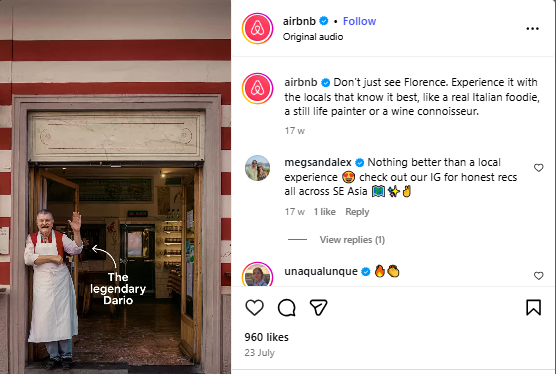
Color grading is particularly important in some videos, such as those for travel and hospitality or real estate videography, where you need everything to look extra aesthetically pleasing. This video on Airbnb's Instagram page is a good example for inspiration.
Marvel Studios does a brilliant job utilizing this technique in its superhero movies. It uses color grading to distinguish different settings and atmospheres - such as vibrant colors for action sequences and muted tones for dramatic moments.
This careful use of color lets them create immersive worlds that resonate with audiences globally.
Editors can experiment with AI-generated color palettes or apply them to multiple scenes quickly. Tools like DaVinci Resolve's AI Color Match help create cinematic looks without manual trial-and-error, letting editors focus on storytelling and visual flow. The following video shows how to use this AI tool.
B-roll is supplementary footage inserted into the main narrative to provide context, emphasize details, and boost visual interest. It is one of the most creative video editing techniques because it lets editors illustrate points by offering supporting information. B-roll is used across every video format -- from broadcast documentaries to corporate video production -- to add visual depth and keep audiences engaged.
Consider a documentary about wildlife conservation. B-roll footage might include close-ups of endangered species in their natural habitats or interviews with scientists. These clips enrich the storytelling by adding depth and visual variety.
You can draw inspiration from the GoPro Hero6: This Is the Moment video.
It uses a diverse B-roll that captures thrilling moments from various angles. Viewers feel immersed while watching adrenaline-pumping activities like surfing, skiing, or skydiving. This technique showcases the versatility of their cameras and makes their content captivating for adventure enthusiasts worldwide.
Motion graphics are among the most basic video editing techniques used by brands globally. It involves adding animated elements like shapes, texts, and logos to a video. This makes complex ideas easier to understand and adds an engaging layer to the content.
Slack does this regularly on Instagram.
Motion graphics can convert a bland explainer video into an interesting visual story. For instance, it can animate an app's features, demonstrate how it works, and highlight key benefits with eye-catching visuals. Naturally, viewers grasp information quickly in animated explainers since they hold attention well.
Burger King did a pretty good job employing this video editing technique.
The brand features sleek, animated text and graphics in its rebranding introduction video. Not only is the video compelling, but it effectively communicates what Burger King is about.
If you're planning to use motion graphics in your videos, there are plenty of AI tools that can simplify the process. Runway is a good option that lets you add dynamic visuals without designing each frame manually. The AI predicts timing, motion, and placement, to keep viewers engaged while simplifying the workflow.
Check out this video to learn how to make motion graphics with AI.
This technique involves carefully crafting audio elements (including sound effects, background music, and dialogue) to enhance the overall experience. It helps set the mood and adds depth to the video content.
In many cases, the music might just be what helps your social media video ads go viral. That's what happened in Gap's case, when they used Katseye's song in their ad.
Thriller movies, for instance, often feature eerie background music and subtle sound effects like creaking doors or footsteps to create a tense atmosphere. This keeps viewers on the edge of their seats. Likewise, upbeat music in a travel blog can make the adventure feel more exciting and enjoyable.
Coca-Cola excels in this technique in its commercials. The brand uses catchy tunes to evoke feelings of happiness and togetherness. This makes the ads memorable and enhances the emotional connection with the audience.
Here's an example.
You can use AI to balance dialogue and sound effects automatically and reduce the time spent adjusting levels manually. It detects peaks, removes background noise, and optimizes clarity. Descript's Studio Sound is a useful tool that lets editors refine audio quickly. The resulting voice is clearer and the music complements the scene.
Here's a tutorial on how to use it.
If you're looking for some cool video editing techniques, you can't miss this one. Text overlays include textual information such as captions, titles, or key points in video footage.
For example, this video from Hilton Hotels introduces the concept of the video with a text overlay.
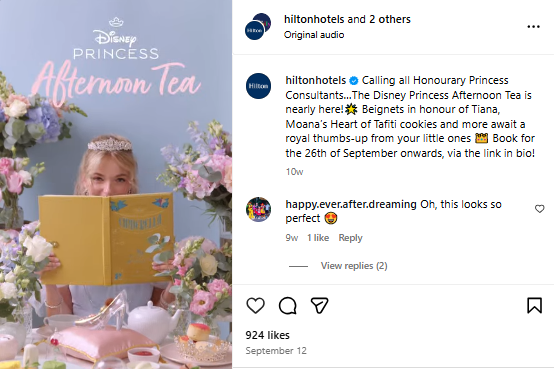
This technique helps the videographer clarify information and reinforce the video's message.
Consider a recipe video. Text overlays can display ingredient lists, cooking times, and step-by-step information as the chef prepares the dish. This ensures that viewers can follow along easily and replicate the recipe accurately.
Here's an example of a text overlay video:
The brand Bestie Health displays text on the screen to clarify the content and make it more visually appealing. Besides, it caters to a broad audience interested in quick and accessible content.
This is one of the most popular video editing techniques. In this technique, the speed of the footage is intentionally altered to create dramatic effects.
Slow motion slows the action, letting viewers notice minor details and savor important moments. On the other hand, speed ramping smoothly transitions between different speeds and adds a flow to the video.
For example, slow motion can capture the precise moment when, say, a basketball player makes a slam dunk. This allows viewers to see their skill and athleticism. Speed ramping then transitions back to normal speed as the player lands, creating a visually appealing sequence.
You don't have to do this manually in a video editor anymore. With an AI tool, like Gling.ai, you can automate slow motion videos. All you have to do is select the section you want to change the speed of, and the tool does the rest.
Here's how to use it.
Take a page out of Red Bull's book. The brand excels in utilizing slow motion and speed ramping in its extreme sports videos. Red Bull's use of these techniques emphasizes the thrill and intensity of activities like motocross and skydiving. This captivates the viewers and keeps them engaged till the end of the video.
This is where the audio and video transitions are offset to create a more seamless flow between scenes. In a J-Cut, the audio from the next scene starts before the current scene ends, while in an L-Cut, the audio from the current scene continues playing as the visual transitions to the next scene.
For example, in an interview video, an L-Cut might be used where the interviewee's voice continues while the video cuts to relevant B-roll footage. L-Cuts can also be used in case study videos in the same way. Pedigree does a great job of it in this video.
Conversely, a J-cut might introduce the next interview segment's audio before the visual switch. This prepares the viewer for the upcoming topic.
National Geographic effectively uses J-Cuts and L-Cuts in its documentaries. This helps create smooth transitions between interviews and breathtaking nature footage. Viewers get a cohesive watching experience throughout the documentary. Here's an example video of National Geographic featuring Kim Jong-Un, the leader of North Korea:
Storyboarding is a pre-production planning technique where a series of illustrated frames are created to visualize the sequence of a video or film.
Each frame represents a key moment or shot. This helps video editors map out the narrative flow, camera angles, and transitions before the actual film begins, ensuring a coherent and well-organized production process.
Storyboarding, for instance, often allows creators to plan out each scene, including character movements and backgrounds, before any animation work starts. This, in turn, helps identify potential issues early on and ensures that the story unfolds smoothly.
Disney is known for using such video editing techniques. It often uses storyboards to plan every aspect of its animated films, from the storyline to the visual details. Here's an example of storyboarding from Frozen 2:
This careful planning helps create seamless transitions and well-defined characters. The result? A high-quality animation.
The good news is AI tools make storyboarding a breeze now. For example, Shai Creative assists you in storyboarding during pre-production of video ads and brand films. You can then use AI to create shot lists, too.
Similarly, Storyboarder.ai is used by video marketing agencies around the world to storyboard for marketing videos, commercials, corporate videos, short films, and professional brand content.
The following playlist shows how to use the tool.
Here are some bonus video editing techniques to consider next time you edit a video for your business.
.gif)
Gone are the days when video editing was merely about cutting and splicing. Today, the concept has shifted to creativity, storytelling, and engaging the audience in an effortless yet impactful way.
We shared numerous video editing techniques to help you add professionalism to your work. To put them into practice, pair your workflow with the right toolkit: our roundup of the best video editing apps covers the top desktop and mobile picks for every skill level. Whether you need corporate video production, real estate videography, or brand storytelling, our team delivers polished, professional results.
So, go ahead, experiment, and watch as your videos transform into compelling masterpieces that resonate with your audience.
The possibilities are endless, and your creative journey is just the beginning. Book a free, no-obligation Discovery Call with INDIRAP, and our video production team will help you get started with smart video editing techniques.
Beginner-friendly techniques include cutting on action, jump cuts, adding transitions, music addition, and basic color grading. These approaches improve pacing and engagement without requiring advanced software skills.
B-roll adds visual context, emphasizes key points, and keeps videos interesting. It can show details or action from multiple angles to support the main story and help viewers connect with the content.
J-cuts start the next scene's audio before the visual changes, while L-cuts let the current scene's audio continue into the next visual. Both techniques create smooth transitions and maintain narrative flow.
Storyboarding maps out scenes, camera angles, props, cuts, and transitions before filming to help editors create a well-paced video without needing extensive trial-and-error during editing. It is especially valuable in corporate video production and brand storytelling, where every second of screen time counts.
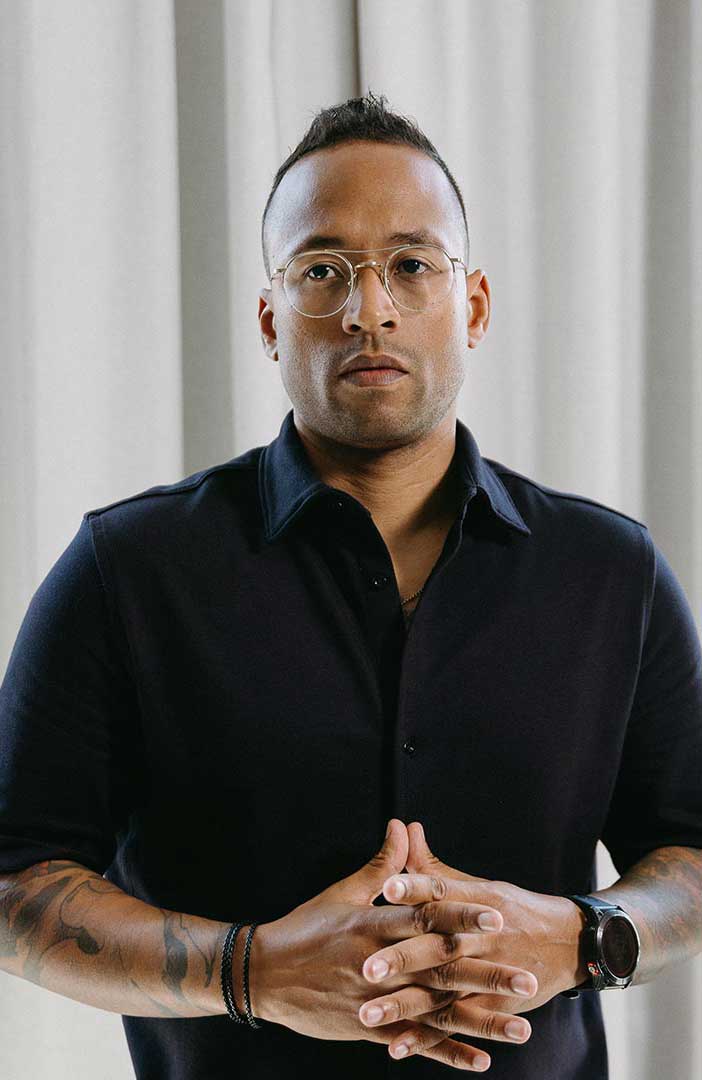

Julian Tillotson is the Founder & CEO of INDIRAP, a full-service video production and creative strategy agency based in Chicago, IL. With 10+ years of experience, INDIRAP has delivered 20,000+ videos to 900+ clients across 40+ industries, making it one of North America's leading digital creative agencies.


.png)
.png)